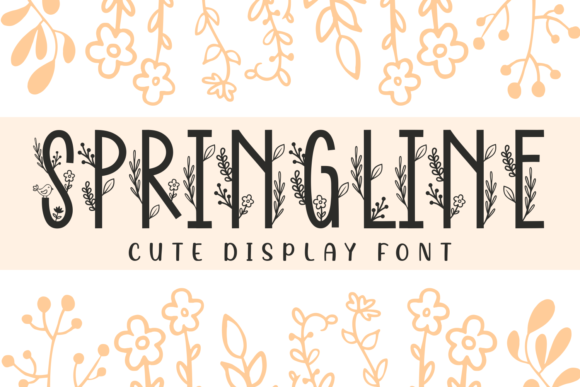
Springline: A Delightful Display Font for Creative Projects
What Is Springline?
Springline is a charming display font that brings a touch of elegance and whimsy to any design. With its friendly personality and ornate floral accents, this typeface stands out in the world of display fonts by blending modern typography with delicate illustrations. Whether you're creating wedding invitations, branding materials, or social media graphics, Springline adds a soft yet professional flair. The best part? You can download Springline font free from several trusted platforms, making it accessible for both personal and commercial use. As one of the best display fonts for creative projects, Springline offers a unique balance between style and usability, especially when compared to other premium display fonts on the market.
Letterforms and Visual Personality
The letterforms in Springline are meticulously crafted to reflect a sense of warmth and approachability. Each character features subtle curves and flourishes, often accompanied by tiny flowers that give the font its signature charm. This attention to detail makes Springline feel like more than just a typeface—it's an artistic statement. It’s ideal for designs where you want to evoke a sense of creativity, joy, or femininity without overpowering the message.
Weight and Contrast
While Springline has a light and airy appearance, it maintains enough weight to remain legible even at smaller sizes. The contrast between thick and thin strokes is balanced, allowing the font to be used effectively across various applications—from large headlines to short phrases. Its gentle contrast sets it apart from heavier, bolder display fonts and gives it a refined edge.
Spacing and Readability
Spacing in Springline is generous and well-proportioned, which helps prevent the characters from feeling cramped or cluttered. This makes it suitable for titles and headings but not necessarily for long body text. The open counters and consistent rhythm across the alphabet contribute to its overall readability while maintaining a decorative aesthetic. Compared to similar fonts, Springline manages to strike a great balance between visual appeal and functional spacing.
Springline for Logo Design
When it comes to logo design, choosing the right font can define your brand’s identity. Springline is particularly effective for logos that aim to convey a fresh, youthful, or artistic vibe. Its floral embellishments add a memorable touch, making it perfect for boutique brands, lifestyle businesses, or anything with a botanical theme. Just remember to test how it looks in black and white before finalizing your design.
Springline for Branding
Branding often requires consistency and personality, and Springline delivers both. Use it in taglines, headers, or as a supporting element in your brand assets. It pairs beautifully with minimalist layouts, helping your brand stand out with a unique typographic voice. If you're looking for a premium display font that can elevate your branding efforts, Springline is a strong contender.
Springline for Wedding Invitations and Cards
Wedding invitations need to capture the essence of love and celebration, and Springline does just that with its elegant and romantic look. The floral details make it feel handcrafted, adding a personal and heartfelt touch to your stationery. Many designers prefer using it for main titles and then switching to a cleaner font for the body text. For those wondering if it’s suitable for such formal events, the answer is yes—just ensure the font license allows for commercial use.
Springline for Social Media and Posters
With its eye-catching style, Springline is a top choice for social media content and posters. It works exceptionally well for Instagram posts, Pinterest boards, or promotional banners where the goal is to grab attention quickly. Its versatility also means it can be adapted to different color schemes and backgrounds, making it ideal for seasonal campaigns or event marketing. Don’t forget to check what fonts pair well with Springline to maintain a cohesive design across your visuals.
Springline for Packaging and Merchandise
If you’re designing product packaging or merchandise, Springline can help create a distinctive look. Its playful nature suits gift boxes, greeting cards, and apparel labels, especially in niches like fashion, beauty, or home decor. However, since it's a display font, it's recommended to use it sparingly and focus on key elements like product names or slogans. Combining it with a free display font for fonts in the body text ensures clarity and impact.
Font Pairing & Combinations
Knowing what fonts pair well with Springline is essential to achieving a harmonious design. Because of its ornate style, it pairs best with clean, simple sans-serif or serif fonts that let it shine without competing. Here are a few suggestions:
- Springline + Playfair Display: A classic serif pairing that balances elegance and playfulness.
- Springline + Lato: A sleek sans-serif combo that enhances readability and contrast.
- Springline + Great Vibes: A script font pairing that adds movement and romance.
These combinations allow Springline to take center stage while ensuring the rest of your design remains professional and easy to read. Always test your pairings in real-life scenarios to see how they perform together.
Licensing & Commercial Use
One of the most common questions about Springline is: “Is Springline free for commercial use?” The answer depends on the source of your download. While some platforms offer it for free under specific licenses, others may require a purchase for full commercial rights. Always review the Springline font license carefully before using it in paid projects. If you plan to incorporate it into branding or merchandise, consider buying a premium version to avoid any legal issues down the line.
For personal use, Springline is generally available for free. But for commercial use, you’ll want to confirm whether the font supports that usage or if you need to buy a license. Some font bundles include extended rights, so checking for a font pack that covers all your needs might be worth the investment.
How to Download & Use Springline
Getting started with Springline is easy. You can find a Springline free download on platforms like DaFont or FontSquirrel. For more reliable licensing and support, CreativeFabrica offers a premium display font version that includes commercial rights. Once downloaded, you can install the font on your computer or upload it directly into design tools like Canva, Word, or Photoshop.
Here’s how to use Springline in popular design software:
- In Canva: Upload the font file through the custom fonts section to access it in your templates.
- In Word: Install the font on your system and select it from the font dropdown menu.
- In Photoshop: After installation, choose Springline from the font options to apply it to your text layers.
Whether you’re using it for a blog graphic, poster layout, or website header, these steps will help you integrate Springline smoothly into your workflow.
Designer Notes & Tips
As a designer, I recommend using Springline strategically. It’s a display font, so it should be reserved for headlines, titles, and short phrases rather than lengthy paragraphs. When testing it in small sizes, be sure to adjust tracking slightly to improve legibility. Also, always preview it in grayscale to ensure it still looks good without color.
If you're comparing Springline vs similar fonts, consider how each handles ornamentation and spacing. Some fonts in the same category may have overly intricate details that compromise readability, but Springline strikes a nice balance. Another tip: don’t overuse the floral ornaments. Let them enhance the design rather than overwhelm it.
Finally, if you're working on a project that requires multiple versions of Springline (like bold or italic), check whether the font bundle you purchased includes those styles. Having a complete font pack ensures you can customize your designs without missing out on stylistic variations.